
Changing Your Restaurant POS? Plan the Cutover Before You Touch the Hardware
Replacing a restaurant POS system is not just a software project. It touches nearly every part of the operation.
Menus.
Payments.
Kitchen routing.
Printers.
Online ordering.
Gift cards.
Employee access.
Reporting.
Accounting.
Training.
And, most importantly, service.
That is why a POS migration should not begin with unplugging the old terminal and installing the new one. A successful transition starts well before cutover day.
The goal is simple: Change the technology without making the restaurant feel like everything changed at once.
Here is how to plan a smoother restaurant POS transition.
1. Document What the Current System Actually Does
Before replacing your POS, understand what the current one does for you.
That sounds obvious, but restaurants often underestimate how many workflows have quietly become dependent on the system over the years.
Create an inventory of:
- POS terminals
- Handhelds
- Payment devices
- Printers
- Kitchen display systems
- Cash drawers
- Online ordering
- Delivery integrations
- Gift cards
- Loyalty programs
- Accounting integrations
- Scheduling or payroll connections
- Inventory tools
- Reporting workflows
Then identify which of those systems communicate with the POS.
You do not want to discover during cutover that a process everyone assumed was independent actually relied on the old system.
2. Write Down What Needs to Improve
A POS migration is a chance to fix problems. You don't need to copy every old workflow into a new system. Before building the replacement environment, document what frustrates employees and managers today.
For example:
- Too many taps to enter an order
- Confusing modifier screens
- Difficult reporting
- Poor kitchen routing
- Manual online-order entry
- Too many manager overrides
- Inconsistent discounts
- Slow payment workflows
- Weak multi-location reporting
Those issues should become requirements for the new setup. Otherwise, it's easy to recreate the same problems on a newer platform.
3. Clean Up the Menu Before You Migrate It
One of the biggest mistakes in a POS conversion is copying the existing menu exactly as it is.
Older restaurant menus often contain years of accumulated clutter:
- Duplicate items
- Retired menu options
- Old pricing
- Unused modifiers
- Inconsistent naming
- Temporary buttons that became permanent
- Discounts nobody remembers
- Incorrect tax settings
A migration is an opportunity to start clean. Before programming the new POS, review every category, item, modifier, price, tax rule, and discount. Ask whether each one still belongs. The result should be a menu designed for the restaurant you operate today.
4. Map the Hardware
Determine exactly where every piece of equipment will go.
That includes:
- POS terminals
- Handheld charging stations
- Payment devices
- Guest-facing displays
- Kitchen printers
- Receipt printers
- Kitchen displays
- Cash drawers
- Network equipment
Create a simple location map if the restaurant is large or complex. This matters because installation becomes much easier when everyone already knows: what goes where, what it connects to, and what it is supposed to do.
It also helps identify missing power outlets, network drops, mounting requirements, or cabling before installation day.
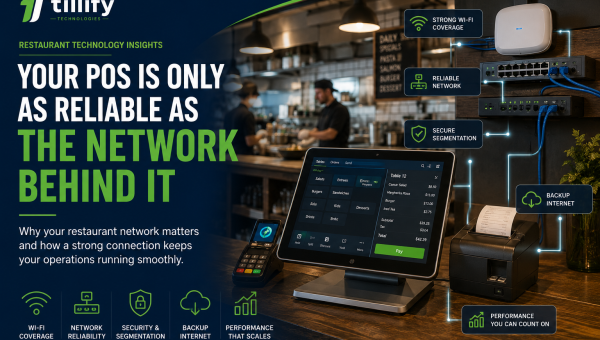
5. Confirm the Network First
Do not wait until installation day to find out whether your network can support the new POS. If the restaurant uses handhelds, kitchen displays, cloud services, online ordering, payment devices, or other connected technology, the network becomes part of the POS environment.
Verify:
- Internet service
- Router/firewall
- Network switches
- Wireless coverage
- Cabling
- Access-point placement
- Backup connectivity
- Device segmentation
If upgrades are needed, make them before the POS deployment whenever possible. Installing a modern POS on an unreliable network does not produce a reliable POS.
6. Set Up Payment Processing Early
Payment processing deserves its own migration plan.
Confirm:
- Merchant account approval
- Processing rates
- Payment hardware
- Terminal activation
- Funding account
- Refund procedures
- Tip handling
- Offline-payment behavior
- Online-order processing
Run real test transactions before cutover.
Then refund or void them.
Don't open service for the first time until you know whether the payment devices are properly configured.
7. Rebuild Kitchen Routing Carefully
Every menu item needs to reach the right production area.
That might mean:
Bar → drinks
Hot line → entrées
Fry station → appetizers
Pantry → desserts
Expo → complete order information
If you use kitchen display systems, confirm which items appear on which screens and how courses or order timing are handled.
Test individual items.
Then test complete orders.
A burger ringing correctly doesn't prove that a full table with appetizers, drinks, entrées, and desserts will route correctly.
8. Reconnect Every Integration
A new POS may need to reconnect with several other systems.
Common examples include:
- Online ordering
- Delivery services
- Accounting
- Scheduling
- Payroll
- Reservations
- Loyalty
- Gift cards
- Inventory
- Marketing platforms
Don't assume an integration is complete just because the accounts are connected.
Test the actual workflow.
Does the online order arrive?
Does the right tax apply?
Does accounting receive the correct sales data?
Does the gift card balance work?
Does the loyalty account update?
A successful login isn't the same as a successful integration.
9. Plan for Historical Data
Changing POS platforms can create an awkward question:
What happens to the old data?
Before canceling the previous system, determine what information you may need later.
That could include:
- Sales history
- Tax reports
- Employee records
- Gift-card balances
- Customer data
- Menu history
- Payment records
- Accounting exports
Find out how long you will retain access to the old platform. If needed, export important reports and records before closing the account. You do not want to discover six months later that historical information you assumed would remain accessible is gone.
10. Train Managers Before the Rest of the Staff
Managers should understand the new POS before employees begin training. They need to be comfortable with more than order entry.
Managers may need to know how to:
- Void items
- Apply comps
- Issue refunds
- Reopen checks
- Move tables
- Adjust payments
- Manage cash drawers
- Add employees
- Change permissions
- Run reports
- Troubleshoot common problems
When staff training begins, managers should already be able to answer basic questions. That reduces the number of small problems that escalate to outside support during the first few days.
11. Train Employees With Real Orders
Do not train employees by simply walking through the buttons.
Create realistic scenarios.
Have servers enter:
- Modified entrées
- Allergy notes
- Split checks
- Separate payments
- Discounts
- Gift cards
- Cash transactions
- Refunds
- Takeout orders
Bartenders should practice tabs.
Cashiers should practice high-volume counter workflows.
Managers should practice exceptions.
The closer training feels to an actual shift, the more useful it becomes.
12. Run a Mock Service
Before the final transition, simulate service. Do not just test one terminal at a time. Have several employees use the system at the same time.
Ring in multiple tables.
Send orders to different prep stations.
Process cards.
Split checks.
Enter online orders.
Print receipts.
Issue discounts.
Close the day.
Then intentionally create a few problems.
Disconnect a printer.
Enter an incorrect payment.
Have someone forget how to transfer a check.
You are trying to uncover problems while the restaurant is empty, not while guests are waiting.
13. Decide What Happens to Open Gift Cards and Loyalty Balances
Gift cards and loyalty programs can complicate migrations. If the restaurant has existing balances, determine how they will transfer.
Questions to answer include:
- Will balances migrate automatically?
- Do they need to be imported?
- Will old cards continue to work?
- Is there a conversion date?
- Will customers need new accounts?
- What happens to existing rewards?
Communicate clearly with staff so they know how to handle guests during the transition. A technology change should not become a customer-service problem.
14. Pick the Cutover Time Carefully
The best cutover window is usually the time with the lowest operational risk.
That may be:
- Overnight
- During a scheduled closure
- On the restaurant's slowest day
- Between service periods
Avoid introducing major technology changes immediately before your busiest shift if you can help it. Give yourself time to install, test, correct issues, and verify the system before the next rush.
15. Keep the Old System Available Temporarily When Possible
Depending on the platforms and contracts involved, there may be value in keeping access to the previous system for a short period.
That can help with:
- Historical reporting
- Payment reconciliation
- Customer questions
- Old gift-card research
- Comparing reports
- Looking up previous transactions
That does not mean running both POS systems simultaneously for service. It simply means avoiding unnecessary loss of historical access before you are confident the migration is complete.
16. Have Support Available During the First Live Shifts
The most important testing happens when real guests arrive. Make sure employees know who to contact if something goes wrong.
Have support information readily available for:
- POS software
- Payment processing
- Network
- Online ordering
- Integrations
- Hardware
Have someone closely involved with the deployment available during the first few services. Small configuration adjustments are common. The goal is to resolve them quickly before they become permanent workarounds.
What Not to Do During a POS Migration
A few shortcuts create disproportionate risk.
Don't copy the old menu mindlessly.
You will bring old problems into the new system.
Don't wait until cutover day to test payments.
Payments should already be verified as working.
Don't assume integrations work.
Place real test orders and follow the data.
Don't train employees five minutes before service.
Give them time to develop familiarity.
Don't change everything at once unless you have to
If you are replacing the POS, online ordering, loyalty system, network, payroll platform, and reservation system simultaneously, troubleshooting becomes much harder. Sometimes those changes must happen together. When they do not, consider sequencing them.
The First Week Matters
A POS migration is not finished when the terminals turn on. Pay attention during the first week.
Ask employees:
- What is slowing you down?
- Which buttons are hard to find?
- Which modifiers are confusing?
- Are kitchen tickets clear?
- Are managers getting the reports they need?
- Are online orders flowing correctly?
Small early adjustments can dramatically improve adoption. The POS should become easier to use as the restaurant settles into it.
The Bottom Line
Switching restaurant POS systems does not have to be chaotic. The key is treating the migration as an operational project rather than a hardware swap.
Document the current environment.
Clean up the menu.
Prepare the network.
Configure payments.
Test integrations.
Train the staff.
Run a mock service.
And have a support plan for the first live shifts.
Most importantly, use the transition as an opportunity to improve how the restaurant operates rather than simply recreating the old system on new hardware.
A successful POS migration should feel less like replacing technology and more like removing friction from the restaurant.
Planning a POS Change?
Tillify Technologies helps restaurants manage the work between choosing a new POS and actually putting it into operation.
From onboarding and menu configuration to installation, testing, training, and ongoing support, we help restaurants prepare for a smoother transition.
New technology is only valuable when your team is ready to use it.