Restaurants maintain a lot of equipment.
Refrigeration gets serviced.
Hoods get cleaned.
Cooking equipment gets inspected.
HVAC systems get checked.
But restaurant technology often receives a different kind of maintenance plan:
Wait until something stops working.
A POS terminal starts running slowly.
A printer disconnects more often.
An old employee still has manager access.
An integration quietly stops syncing.
A menu fills up with outdated buttons.
None of those issues may seem urgent at first.
Then the restaurant gets busy.
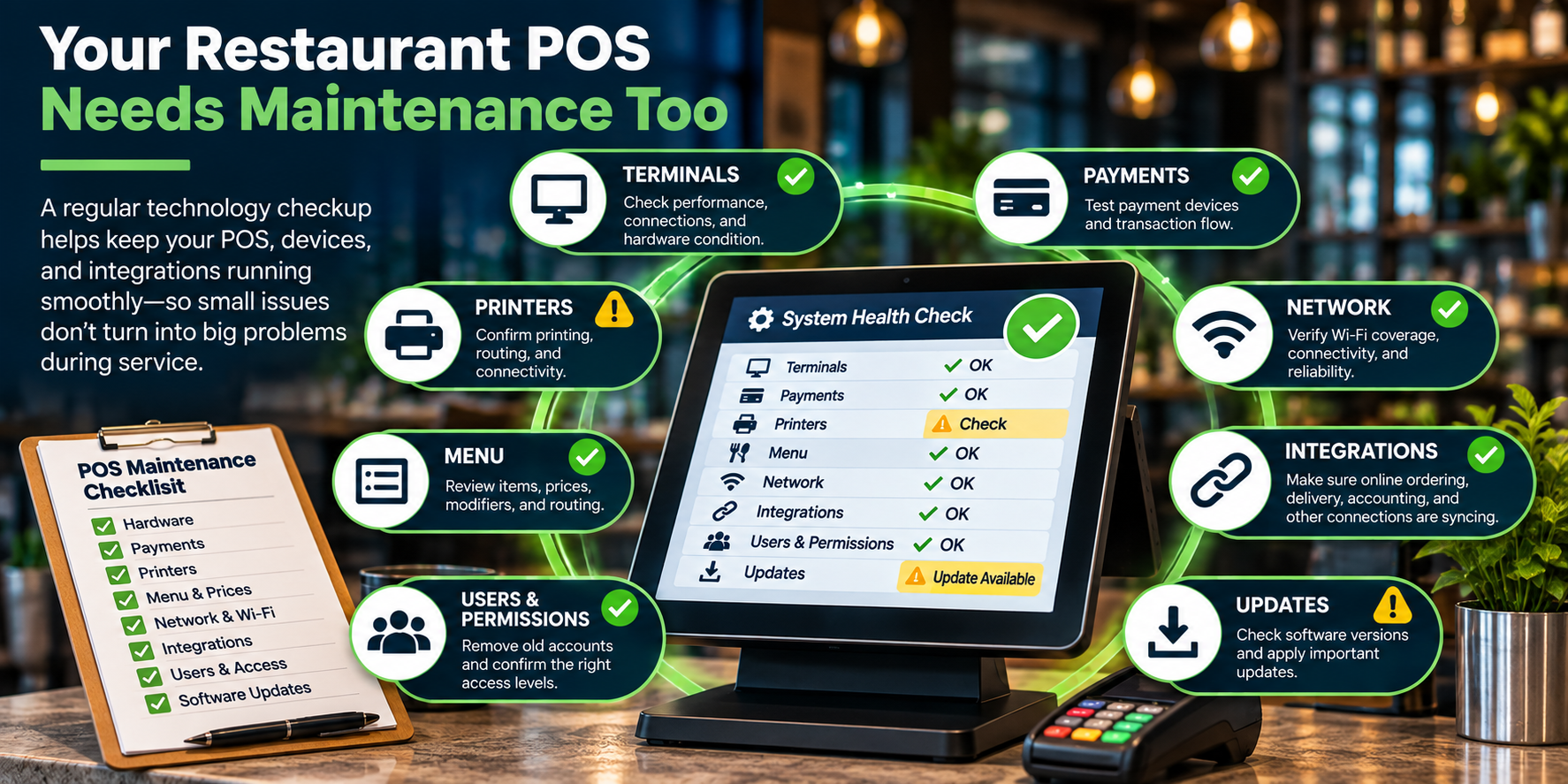
Preventive maintenance isn’t only for physical equipment. Your POS, network, payment devices, printers, integrations, and software all benefit from regular attention.
You don’t need to rebuild your technology environment every month.
You do need to make sure it still works the way you think it does.
Here are twelve areas restaurants should review periodically.
1. Check Every POS Terminal
Start with the equipment employees use every day.
Walk to each terminal and actually use it.
Look for:
- Slow response
- Frozen screens
- Touchscreen problems
- Damaged cables
- Loose connections
- Broken stands
- Unusual error messages
- Connectivity problems
- Devices that frequently need restarting
Employees often develop workarounds for failing equipment without telling anyone.
You may hear:
“That one always freezes.”
or:
“Don’t use that terminal during dinner.”
If the staff has learned to avoid a device, that’s a maintenance issue, not a personality trait of the terminal.
Small hardware problems are usually easier to address before the device fails.
2. Inspect Payment Devices
Payment terminals are handled constantly.
They deserve regular attention.
Check that each device:
- Powers on normally
- Connects reliably
- Processes transactions
- Accepts expected payment types
- Has no visible damage
- Has secure cables
- Looks the way it normally does
Employees should also know to report anything unusual about a payment device rather than assuming someone else changed it.
If a terminal frequently disconnects or needs restarts, investigate it before it becomes a bigger problem.
3. Test Every Printer
A printer that works 95% of the time is often more frustrating than one that doesn’t work at all.
Test:
- Guest receipt printers
- Kitchen printers
- Bar printers
- Takeout printers
- Label printers
Confirm that tickets are going to the correct destinations.
Also check:
- Paper
- Cables
- Network connections
- Power supplies
- Print quality
Restaurant menus and workflows change, and print routing should change with them. A newly added item that never reaches the correct kitchen station is a configuration problem waiting to become a service problem.
4. Review the POS Menu
POS menus slowly accumulate clutter.
Even restaurants that started with a clean setup may eventually have:
- Duplicate items
- Old prices
- Discontinued dishes
- Temporary specials
- Obsolete modifiers
- Unused discounts
- Test buttons
- Incorrect routing
Set aside time to review the menu rather than waiting for employees to complain.
Ask:
Are the most-used items easy to find?
Do modifier flows still make sense?
Are prices correct?
Are discontinued items gone?
Are kitchen routes accurate?
Are discounts still valid?
A well-maintained menu can make the entire POS feel faster without changing any hardware.
5. Review Users and Permissions
Employees come and go.
Promotions happen.
Managers change.
POS access doesn’t always keep up.
Periodically review the user list.
Look for:
- Former employees
- Duplicate accounts
- Shared logins
- Employees with unnecessary manager permissions
- Managers who no longer need administrative access
Then review what each role can do.
Pay particular attention to:
- Refunds
- Voids
- Comps
- Discounts
- Reporting
- Menu changes
- Employee management
- System settings
Your permission structure should reflect the restaurant you operate today.
Not the restaurant you had two years ago.
6. Test the Network
Network problems often appear as POS problems.
You don’t need to perform an elaborate technical audit every week, but you should pay attention to reliability.
Check whether:
- Terminals stay connected
- Handhelds work throughout service areas.
- Kitchen devices remain online.
- Wi-Fi coverage is consistent.
- Access points are powered.
- Network equipment is physically secure.
- Cabling is organized and intact.
If employees regularly say:
“The handheld doesn’t work near that table.”
that is useful diagnostic information.
Don’t wait for the coverage problem to become normal.
7. Test Backup Internet
If you pay for backup connectivity, make sure it actually works.
A secondary internet connection that has never been tested is more theory than a backup plan.
Periodically confirm:
- The connection is active.
- Failover works as expected.
- Critical systems remain usable.
- Employees or managers know what happens during an outage.
You don’t necessarily need to test this during Friday dinner.
Schedule it during a low-risk period.
The important thing is knowing what will happen before the primary internet connection fails.
8. Check Your Integrations
Restaurant technology integrations can fail quietly.
The POS may continue working while another system stops receiving information.
Review important connections such as:
- Online ordering
- Delivery
- Accounting
- Inventory
- Scheduling
- Payroll
- Loyalty
- Gift cards
- Reservations
- Marketing
Look for unusual gaps.
Did yesterday’s sales reach accounting?
Are online menus synchronized?
Are delivery orders flowing correctly?
Are loyalty transactions updating?
Has anyone been manually fixing something because “the integration has been weird lately”?
Manual workarounds are often the first sign that an integration needs attention.
9. Confirm Online Ordering
Place a test order periodically.
Don’t just look at the online menu.
Use it like a guest.
Check:w4w
- Item availability
- Pricing
- Modifiers
- Required selections
- Taxes
- Fees
- Pickup times
- Payment
- Order confirmation
- POS entry
- Kitchen routing
Follow the order from the guest’s phone to production.
An online ordering site can look fully functional while sending incorrect information behind the scenes.
10. Review Reports and Reconciliation
Your POS should do more than take orders.
It should produce information you trust.
Review whether:
- Payment totals reconcile.
- Sales reports make sense.
- Discounts are categorized correctly.
- Voids and comps are visible.
- Revenue centers are accurate.
- Online sales appear where expected.
- Taxes are configured correctly.
Unexpected numbers aren’t always accounting problems. They can also signal configuration issues.
For example, if one order channel suddenly disappears from a report, the issue may be how transactions are being categorized rather than a loss of actual sales.
11. Check Software and Hardware Support Status
Technology ages quietly.
A terminal may still turn on even though the manufacturer no longer supports it.
Software may still run even though important updates have stopped.
Periodically ask:
- Is the POS version current?
- Are operating systems supported?
- Are payment devices still approved?
- Is network hardware still receiving updates?
- Is replacement equipment available?
- Is any critical device approaching end-of-life?
You don’t need to replace equipment because something newer exists.
But you should know when critical technology is becoming increasingly difficult to support.
That gives you time to plan instead of replacing it during an emergency.
12. Make Sure Someone Knows Who to Call
This may be the simplest maintenance item of all.
Keep an updated support list.
Include contact information for:
- POS provider
- Payment processor
- Internet provider
- Network support
- Online ordering
- Delivery integrations
- Other critical vendors
Also note:
What does each company actually support?
During an outage, nobody wants to hear:
“That’s not us. You’ll need to call someone else.”
Knowing who owns which part of the technology environment can dramatically speed up troubleshooting.
How Often Should You Review Restaurant Technology?
Not everything needs to be reviewed on the same schedule.
A practical approach might look like this.
Weekly
Check obvious operational issues:
- Terminal problems
- Printer problems
- Payment-device issues
- Online ordering
- Employee complaints
These reviews may only take a few minutes.
Monthly
Look more closely at:
- User accounts
- Menu cleanup
- Discounts
- Integrations
- Reporting
- Network reliability
Quarterly
Take a broader look at:
- Hardware condition
- Software versions
- Network equipment
- Backup connectivity
- Vendor contacts
- Security and permissions
- Technology costs
Annually
Step back and evaluate the entire environment.
Ask:
- Is the POS still meeting our needs?
- Are we paying for software we no longer use?
- Is hardware aging?
- Are integrations still appropriate?
- Has the restaurant changed?
- Do employees still perform processes manually?
- What should we improve this year?
The exact schedule matters less than having one.
Listen to the Employees Using the System
Some of the best maintenance information won’t come from a diagnostic screen.
It will come from employees.
Ask them:
What isn’t working well?
What do you have to restart?
What takes too many steps?
Which printer gives you trouble?
Where do handhelds lose connection?
What do you do manually because the system won’t?
Employees often discover technology problems long before management realizes they exist.
The danger is when workarounds become normal.
Don’t Normalize Technology Problems
Restaurants are remarkably good at adapting.
That can actually become a problem.
A printer disconnects every few days.
Someone restarts it.
A handheld won’t work in one corner.
Servers avoid that corner.
A terminal runs slowly.
Employees use another one.
An integration fails.
A manager enters the data manually.
Eventually, everyone accepts the workaround as part of operating the restaurant.
It shouldn’t be.
When the same technology problem keeps returning, investigate the underlying cause.
Maintenance is about solving recurring problems before the workaround becomes permanent.
Keep a Simple Technology Log
You don’t need sophisticated maintenance software.
A basic record can be enough.
Track:
Date
Issue
Device or System
What Happened
What Fixed It
Vendor Contacted
Over time, patterns become easier to see.
Three seemingly unrelated printer failures may all point back to the same network issue.
Repeated terminal restarts may indicate aging hardware.
Multiple online-order problems may trace back to the same integration.
Documentation turns anecdotes into useful information.
Preventive Maintenance Costs Less Than Emergency Maintenance
Technology problems have a habit of becoming urgent at inconvenient times.
Replacing a terminal during a planned maintenance window is one thing.
Trying to replace it at 7:00 PM on Saturday because it finally stopped working is another.
The same applies to:
- Networks
- Printers
- Payment devices
- Integrations
- Software
- Menu configuration
Preventive maintenance gives you options.
Emergency maintenance gives you deadlines.
The Bottom Line
Restaurant technology shouldn’t require constant attention.
But it shouldn’t be ignored either.
POS terminals, payment devices, printers, menus, networks, integrations, users, and software all change over time.
Regularly reviewing them helps catch small problems before they grow.
The objective isn’t to spend more time managing technology.
It’s exactly the opposite.
A little maintenance when things are quiet can prevent a lot of troubleshooting when the restaurant is busy.
When Was the Last Time Your Restaurant Technology Had a Checkup?
Tillify Technologies helps restaurants maintain and improve point-of-sale systems and the technology surrounding them.
From system maintenance and menu cleanup to hardware, networking, integrations, and troubleshooting, regular attention can help keep small issues from turning into service disruptions.
Your restaurant maintains the equipment that keeps the kitchen running. Your technology deserves the same attention.
Comments